At work, I was recently asked to allow an on-premise Python application access to SharePoint Online (SPO).
The now-depreciated way would be to go to your SPO site, append /_layouts/15/appregnew.aspx to the site's name (so it would look something like https://tenant.sharepoint.com/sites/TestSiteforPythonAPIAccess/_layouts/15/appregnew.aspx). This is creating an app registration on the specified SPO site, but this method is being depricated: https://learn.microsoft.com/en-us/sharepoint/dev/sp-add-ins/retirement-announcement-for-add-ins. It works in my production tenant, but fails in my developer space.
My user didn't specify how they intended to authenticate to SPO, so with a little bit of digging, I find https://github.com/vgrem/Office365-REST-Python-Client as a seemingly well supported package that handles this from Python.
Interactive Authentication
If the tool we're using only requires interactive authentication, then this becomes relatively easy:
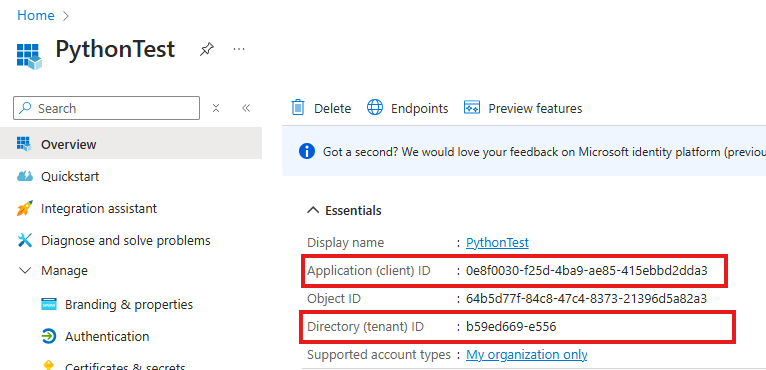
Create an App Registration in Entra. Call it whatever you want. Collect the "Application (client) ID" and "Directory (tenant) ID" for later:
And.. that's it. App Registrations come with a default Graph User.Read right, which is all we need at this point.
Add the user(s) to the SPO site. This is where we're manging the access to the resources for the users.
If we did our stuff right, then thisn should print out my name, and the name of the SPO site.
Unattended Interaction
This gets a bit more spicy.
Generate a self-signed certificiate that you will use for authentication. Something like openssl req -x509 -sha256 -nodes -days 365 -newkey rsa:2048 -keyout privateKey.key -out selfsigncert.crt, followed by cat selfsigncert.crt privateKey.key > selfsigncert.pem should do the trick.
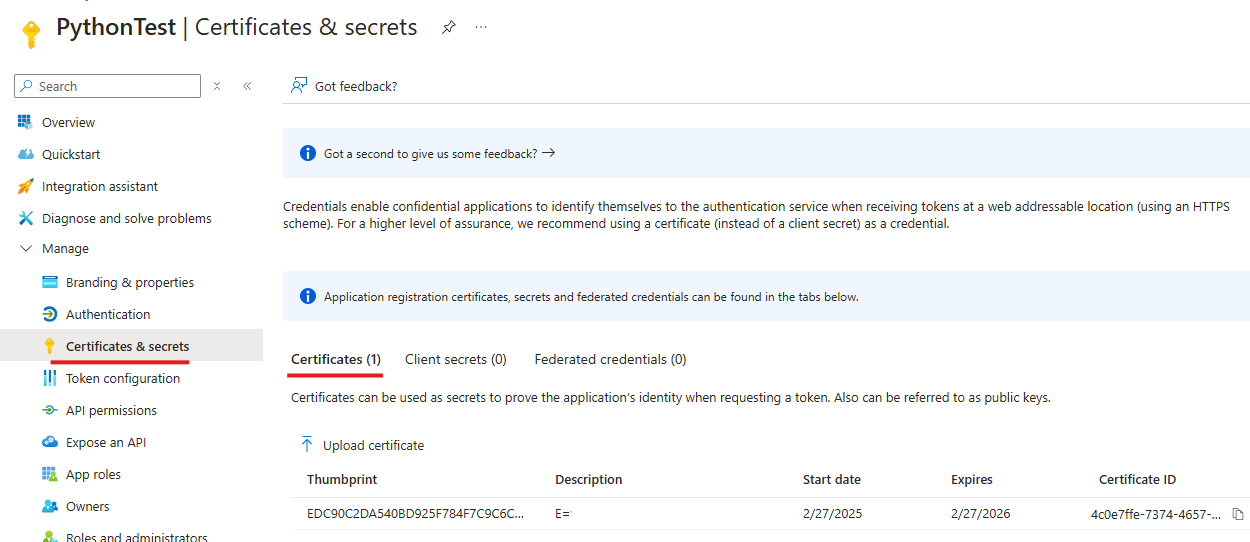
In your Entra App Registration, under Manage, Certificates & Secrets, upload the created selfsigncert.pem in the Certificates tab:
Collect the Thumbprint from this view (though we can get it with openssl: openssl x509 -in selfsignedcert.pem -noout -fingerprint)
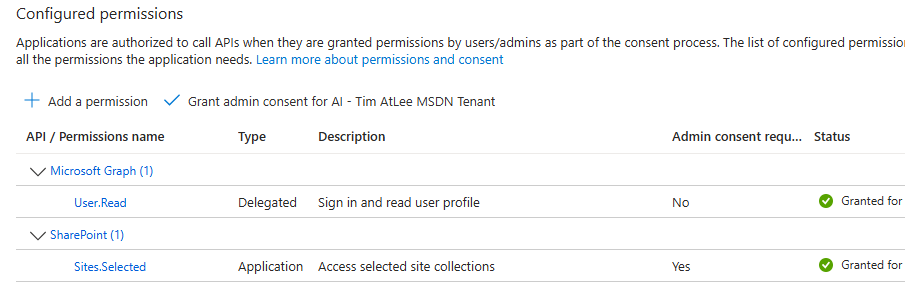
Still in the App Registration, under API Permissions, add SharePoint, Application, Sites.Selected. Grant Admin consent:
There is a Graph Sites.Selected API as well. This does not work with the Python library selected.
Collect the Sharepoint Site ID from your site: https://tenant.sharepoint.com/sites/TestSiteforPythonAPIAccess/_api/site/id. Look for the XML element with type type of Edm.Guid. Collect this too.
To summarize, we need:
The SPO Site ID
The Entra App Registration Client ID
The Entra App Registration name
The Entra Tenant ID
Certificate PEM
Certificate thumbprint
Head over to the MS Graph Explorer and log in as a user with Global Admin access (or I think Site collection Admin).
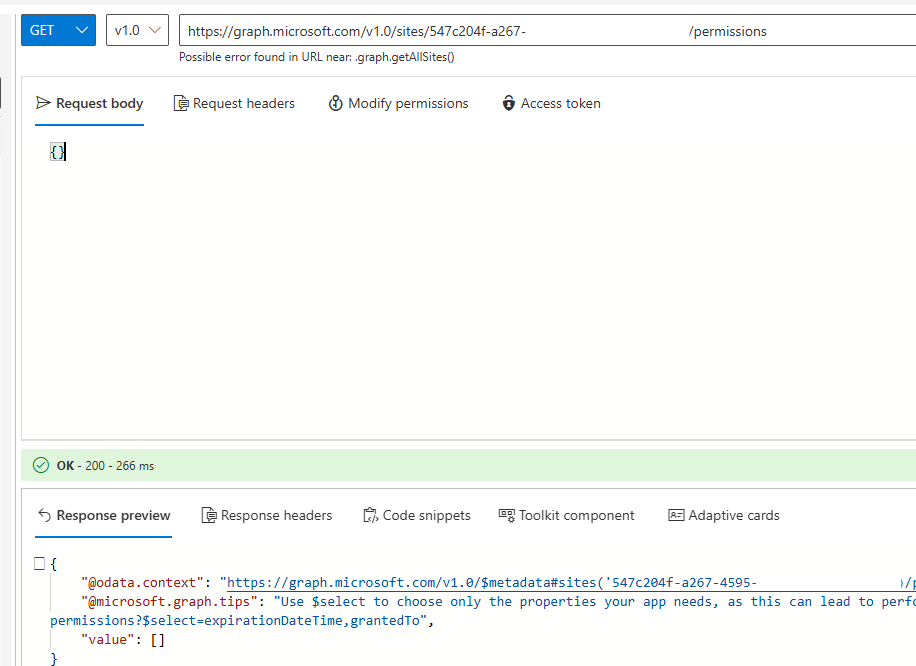
Query GET to https://graph.microsoft.com/v1.0/sites/<SPO Site ID>/permissions. You should get a response, with an empty value:
If you do NOT get a 200 response code, you probably want to address the error first. Check:
Are you logged in? If not, you are probably querying a default set of data
Have you specified the Site ID in the URL?
Compose a POST to the same URL with the following JSON: